Inserting the Calibration Template
DANGER
Danger of death caused by the machine starting up!
Parts of your body could be crushed, cut, drawn in or hit.
- ▶Switch off the machine completely and secure it against it being switched back on.
- ▶Insert the calibration template only when the production machine is stationary.
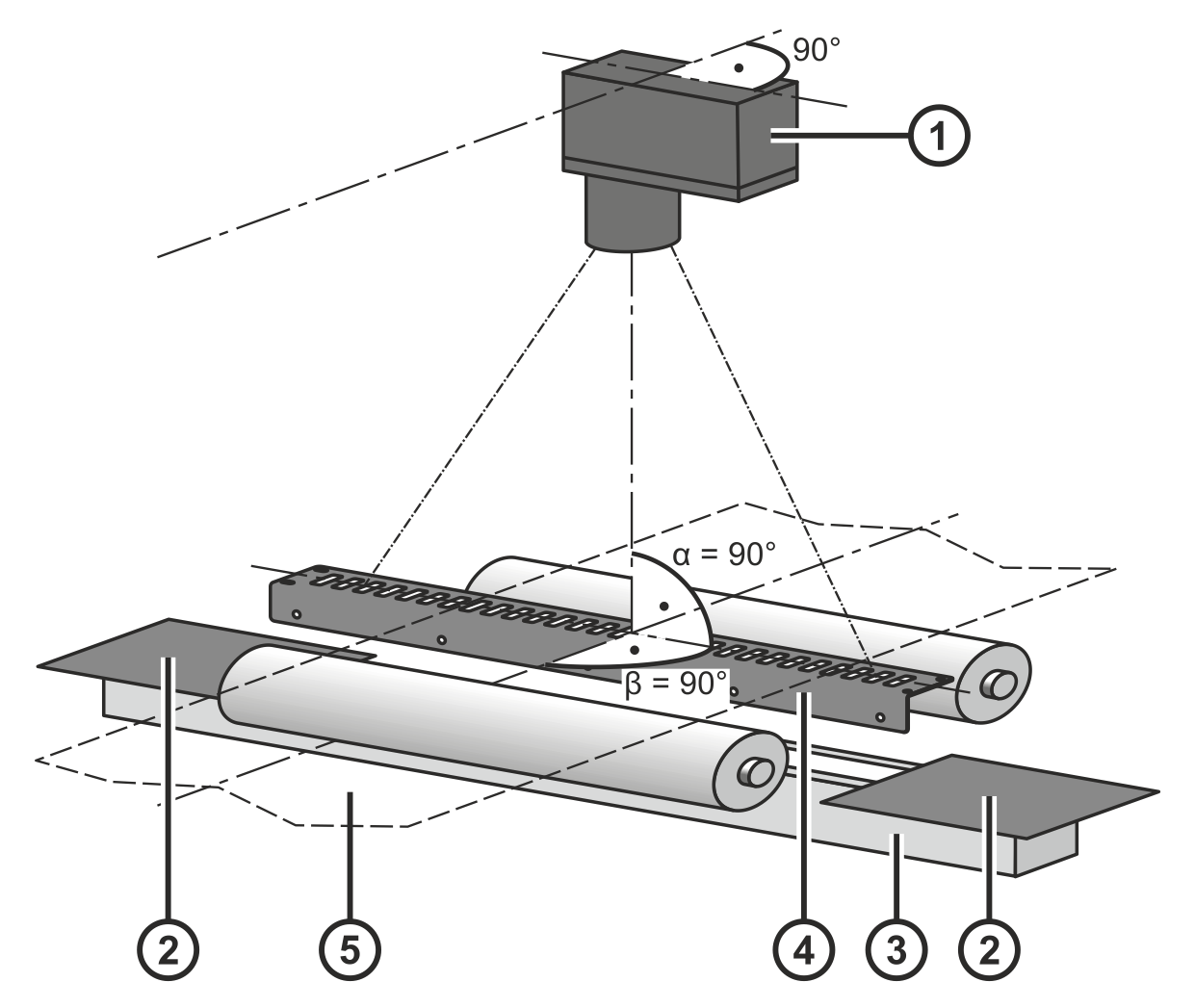
Before you start with the calibration, you have to insert the calibration template into the field of vision of the CCD camera and secure it in place (see figure).
Rotate the smartphone by 90 degrees to show the entire table.
① | CCD camera | ② | Cover (impervious to light) |
③ | Light source | ④ | Calibration template |
⑤ | Material web |
|
|
Observe the following points during the alignment of the calibration template:
- The upper side of the calibration template ④ should (where technically possible) be located at the height of the material top side.
- The angle α between the calibration template ④ and the view axis of the CCD camera ① must be 90°.
- The angle β between the calibration template ④ and the web running direction must be 90°.
- If the light source ③ is longer than the calibration template ④, the area to the left of the of the first hole and the right of the last hole of the template must be covered by a material ② impervious to light.
